 Ian McDonald AI
Android home-screen skill + starter
SKILL.md, a native Android source starter, a standard-library build script and phone verification checkpoints.
ZIP · no APK, SDK, service keys or signing keysA home screen shaped around your day, made with your coding agent.
Ian started with a question: could an agent build a home screen around how he works? These are two of the results. This guide walks you through a smaller first version of your own.
Five chapters · Android 11+ · Phone + computer
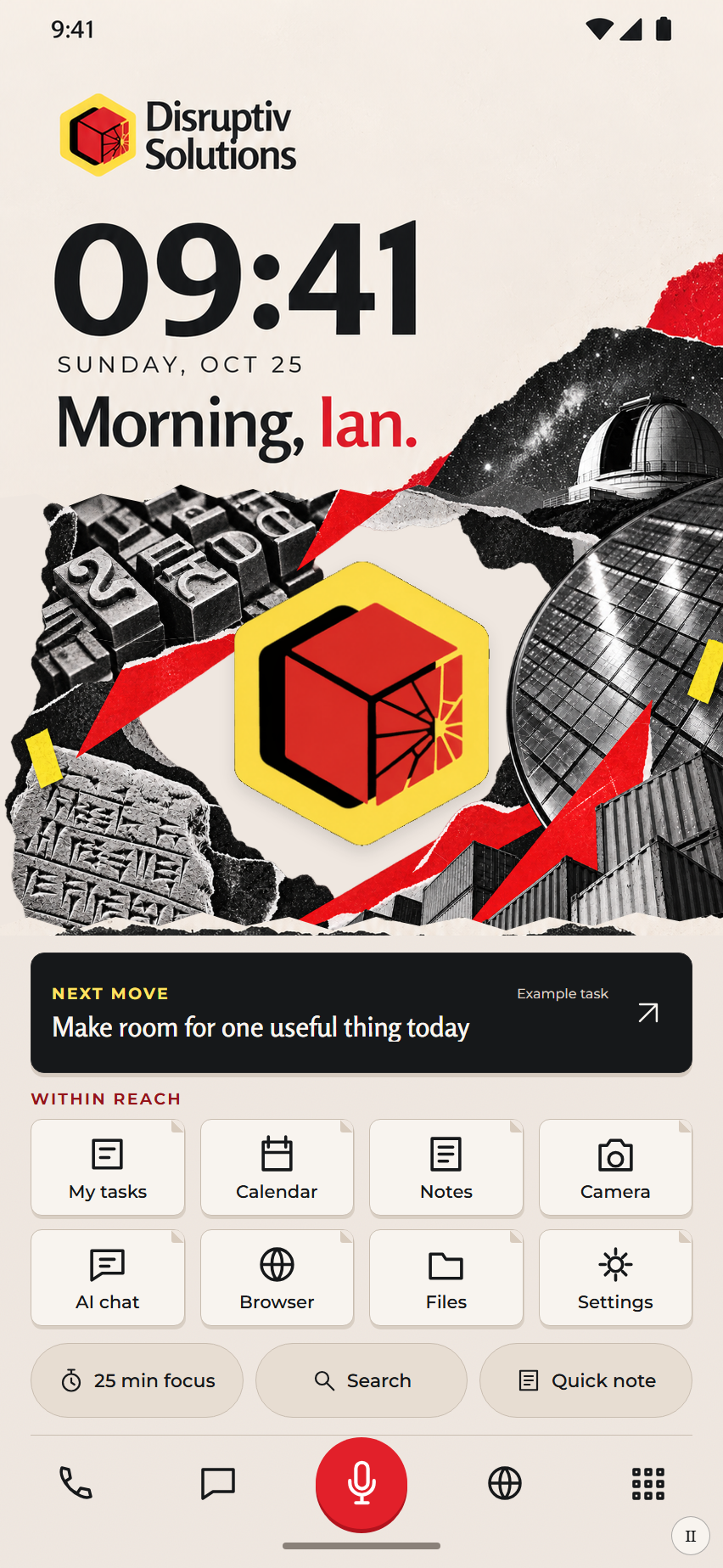
Try it here. Open the app drawer or save a note.
Choose a few apps you use every day, one thing you’d like to see at a glance, and a place to save a thought. That’s enough for your first version.
Choose what belongsFollow the chapters in order. Each ends with a working checkpoint and a prompt you can give your agent.
Start with one phone and a connection your agent can use.
Build around the few things you actually reach for every day.
Turn the preview into an app, then check the everyday controls.
Once the basics work, choose the app that opens when you go Home.
Give one button a real job after the local version works.
You’ll use a coding agent with local file and terminal tools. The kit includes a skill, source starter and checkpoints; your agent will check the build tools and phone connection with you.
Start with one phone and a connection your agent can use.
You’ll need an Android phone, a computer with a coding agent, and a USB data cable or a shared Wi-Fi connection.
Use the kit in Downloads. Ask your agent to read it and locate its source starter.
Unlock it. Enable Developer options and USB debugging, or use Wireless debugging → Pair device with pairing code.
Have the agent identify the observed phone and confirm that the connection is authorized. USB tethering alone is not a debugging connection.
I want to build a personal Android home screen using the attached android-home-screen skill and its source starter.

Read the skill first. Check this computer for local file/terminal access, an Android SDK and Java. Reuse installed tools. Tell me what is available and what is missing before downloading anything large.

Help me connect my chosen phone by USB debugging or wireless pairing. Identify the actual phone before any install; if more than one phone is present, ask which one I mean. Keep pairing details and keys private.

Then guide me through a small design: my colours, three useful shortcuts and local text capture. Build a preview and a signed APK. Open it as an ordinary app first and verify the controls. I will choose when to make it my default Home app. Keep my original launcher and personal data available. Update this app in place rather than uninstalling it.

Distinguish a working preview, a successful build and a real phone test. Add online services or audio-file recording only after the basic home screen works and I ask for those features.
Copy this into your coding agent. Adapt the details to your phone.
Developer options menus vary by phone. On Samsung, look under About phone → Software information → Build number, tap seven times, then return to Developer options. If the connection expires, get the current pairing details instead of retrying an old code. Android’s device setup guide ↗ explains USB and wireless options.
Your agent can identify the correct Android phone, and it has told you which build tools are ready.
Build around the few things you actually reach for every day.
Start with a clock, one focus area, three app shortcuts and somewhere to capture a thought.
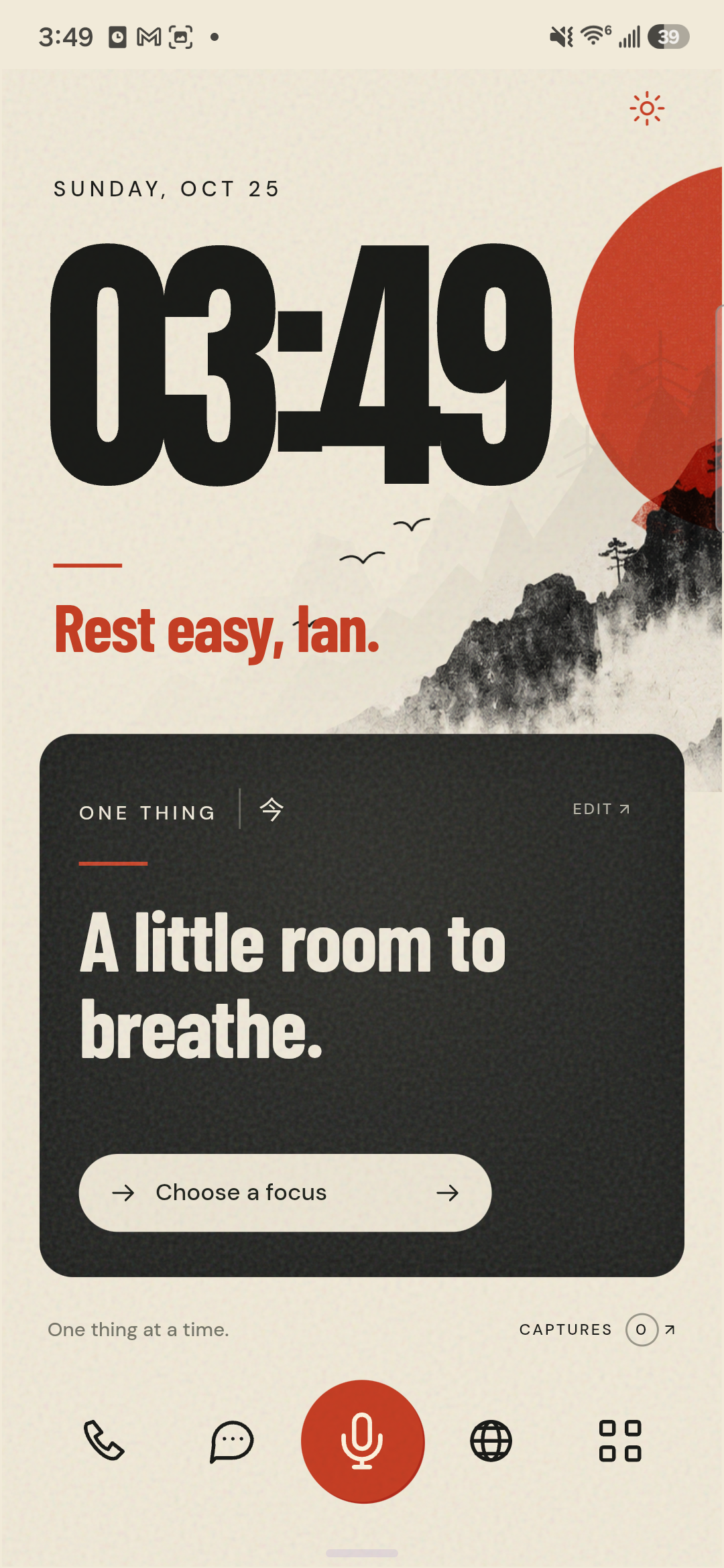
The time and the one thing you want to see.
A task, a reminder, or a little room to breathe.
Your daily apps and a place to capture a thought.
For example: Calendar, Camera and a place to capture a thought. Choose the apps you actually use.
A website, brand guide or image is enough. Say which parts matter: colours, type, layout or mood.
Review text size and touch targets at phone size. Keep decorative details secondary to the controls.
Write your apps, colours and one thing you want to see at a glance.
Saved in this browser as you type.Use the Android home-screen starter to propose one simple screen for me. My colours: [YOUR COLOURS] My visual reference: [REFERENCE OR ATTACHED IMAGE] My three daily apps/actions: [YOUR CHOICES] My preferred greeting/name: [YOUR CHOICE] Include a clock, local text capture and an app drawer. Use my actual installed apps where available. Keep the dock icons only with accessible names. Show the preview at phone size before installing. Label any sample task information as an example.
Copy this into your coding agent. Adapt the details to your phone.
A brand reference should guide the visual system. It does not need to become a miniature version of your entire website. Start with a quiet screen; add more only after using it.
You can explain what every visible control does, and you can read the main information without zooming.
Turn the preview into an app, then check the everyday controls.
Try the launcher as an ordinary app before changing your default home screen.
The agent uses the bundled starter and installed Android tools. It keeps the local signing key so later updates preserve the app’s notes.
Open it, launch an actual app from the drawer and return. Save a note, close Capture, and read it again.
Test the Home gesture, swipe directions, keyboard spacing and returning from another app. Confirm the result on your phone.
Build my chosen Android home-screen design from the included starter.

Use a new project folder and reuse this project’s signing key for updates. Verify the exact target phone before installing. Keep this as an ordinary app for the first test.

Check an actual app launch, saving and reopening a local note, app-drawer gestures, returning from Capture and returning from another app. Keep the home view alive instead of rebuilding it on every return. Report what you actually observed and what still needs a phone test.
Copy this into your coding agent. Adapt the details to your phone.
The kit includes source rather than a preinstalled toolchain. Your agent may need to help install missing Java or Android SDK components. The starter has passed compilation here; its behaviour still needs checking on your specific device. Never erase app data to get around a failed update.
The app opens on your chosen phone. A real app shortcut works, and your saved note is still there after reopening it.
Once the basics work, choose the app that opens when you go Home.
Keep the original launcher installed so you can change your mind.
The starter opens Android’s Home app settings. You choose the new launcher yourself.
Open an app, return home, capture a thought and find it again. Test with the keyboard open as well.
In Settings, find Default apps → Home app and choose your original launcher whenever you want.
My ordinary-app checks passed. Help me open Android’s Home app setting so I can choose this launcher.

Then walk me through the Home gesture, app drawer, one real app launch, a saved note and a few returns home. Show me where I can choose my original launcher again. Preserve my app data and existing home setup.
Copy this into your coding agent. Adapt the details to your phone.
On Samsung, the setting is commonly under Settings → Apps → Choose default apps → Home app. Names vary by Android version. A shortcut icon on your old home screen is not the same as choosing a default Home app.
The system Home gesture brings you to your new screen, and you can switch back to your original launcher.
Give one button a real job after the local version works.
The included starter is local. Online services, voice recording and AI transcription are optional extensions.
Start with a small action: read your next task, or save a thought to your service.
Name the service you own and the smallest useful read or save operation. Your agent checks the supported connection.
Use a secure service connection. AI transcription and online services may require their own accounts, permissions and usage charges.
Check a real save/read, an offline or failed request, and a retry. Keep drafts and audio when a service cannot finish.
Add one optional online action to my working Android home screen.

Service I own: [SERVICE]
Small action I want: [READ OR SAVE ACTION]

Check the service’s supported API/connector and existing authorized credentials. Keep secrets out of the app and browser. Preserve local drafts on failure and prevent duplicate saves on retries. Start with read-only access or a draft/save operation. Show and verify an actual result before labeling the control connected. Do not send messages, activate an agent or mark work complete without my instruction.
Copy this into your coding agent. Adapt the details to your phone.
Audio-file recording is a separate feature from keyboard dictation. If you add it, check microphone permission, tap start/stop, playback, naming, save location and deletion. Test the audio file itself. Service-connected AI also depends on that provider’s available access and credits.
Your chosen button has produced one verified result in your own service, with a clear failure state and a safe retry.
Have your agent check what is already installed before adding anything large.
Reads the skill, edits local source, runs build tools and reports what it verified. It needs local file and terminal access.
Compile and sign the native app. The starter uses installed tools and a Python standard-library build script.
USB debugging or wireless pairing lets the computer install and inspect the selected phone. You authorize that connection on the device.
A repeatable building method, native source and device checkpoints. No private endpoint, provider key or signing key is distributed.
Runs the launcher, opens its actual installed apps and keeps local notes. You choose the default Home app in Android settings.
Online task data, file storage and AI transcription need their own supported connections and possibly usage charges.
I want to build a personal Android home screen using the attached android-home-screen skill and its source starter.

Read the skill first. Check this computer for local file/terminal access, an Android SDK and Java. Reuse installed tools. Tell me what is available and what is missing before downloading anything large.

Help me connect my chosen phone by USB debugging or wireless pairing. Identify the actual phone before any install; if more than one phone is present, ask which one I mean. Keep pairing details and keys private.

Then guide me through a small design: my colours, three useful shortcuts and local text capture. Build a preview and a signed APK. Open it as an ordinary app first and verify the controls. I will choose when to make it my default Home app. Keep my original launcher and personal data available. Update this app in place rather than uninstalling it.

Distinguish a working preview, a successful build and a real phone test. Add online services or audio-file recording only after the basic home screen works and I ask for those features.
Copy this into your coding agent. Adapt the details to your phone.
These examples show Ian’s custom builds. The downloadable kit is a smaller native starter. Check it on your own device before choosing it as your default Home app.
The instructions and source for your first Android home screen.
SKILL.md, a native Android source starter, a standard-library build script and phone verification checkpoints.
ZIP · no APK, SDK, service keys or signing keysA plain text version for your coding agent. Attach the skill ZIP alongside it.
TXTDevice identity, app launch, notes, drawer gestures, returning home and switching back.
MARKDOWNI want to build a personal Android home screen using the attached android-home-screen skill and its source starter. Read the skill first. Check this computer for local file/terminal access, an Android SDK and Java. Reuse installed tools. Tell me what is available and what is missing before downloading anything large. Help me connect my chosen phone by USB debugging or wireless pairing. Identify the actual phone before any install; if more than one phone is present, ask which one I mean. Keep pairing details and keys private. Then guide me through a small design: my colours, three useful shortcuts and local text capture. Build a preview and a signed APK. Open it as an ordinary app first and verify the controls. I will choose when to make it my default Home app. Keep my original launcher and personal data available. Update this app in place rather than uninstalling it. Distinguish a working preview, a successful build and a real phone test. Add online services or audio-file recording only after the basic home screen works and I ask for those features.
Copy this into your coding agent. Adapt the details to your phone.
Extract the ZIP and ask your agent to read the android-home-screen/SKILL.md file. In Codex, ask it to install that folder in your user skills directory, then start a new chat and ask it to use $android-home-screen. It should name the skill and use its starter/checkpoints. In another coding agent, attach the folder and ask it to follow SKILL.md; automatic discovery depends on that agent.
The kit is instructions and source. It does not grant phone access, install Android tools or supply paid services. Do not include the generated .local/ signing key folder when sharing your own project.
Ready to try? Start at Connect your phone. Keep the first version local; add one online action after it works.
Show what you made, ask about a step, or share where you got stuck in this project’s LaunchBox discussion.
Ask a question or share your screen ↗You can read as a guest. A free community account lets you post and reply. Hide private notifications and task details before sharing a screenshot.

Keep the skill, your design brief and your phone checklist together for the next improvement.
Take the kit with you